Showing posts with label Support. Show all posts

Cheap Belkin F1DG102U Flip 2-Port KVM Switch with Audio Support (USB Connection)

10/22/11 Posted by sale

Belkin F1DG102U Flip 2-Port KVM Switch with Audio Support (USB Connection) for Sale - Review & Buy at Cheap Price


List Price : $59.99


Price : $24.95


Belkin F1DG102U Flip 2-Port KVM Switch with Audio Support (USB Connection) Feature | Sale - Review & Buy at Cheap Price

  • Shares one monitor, keyboard, and mouse between two computers
  • Shares one set of speakers between computers
  • Supports PC and Mac notebook and desktop computers
  • Features a 2-color LED that indicates which computer Flip is accessing
  • Installs in three easy steps with no software required
Brand:
List Price:
$59.99
Our Price:
$24.95
Total Price:
$24.95
Usually ships in 1-2 business days
Package Contents: Remote, base with cables, optional fastener strip, user guide The Belkin Flip Plus Audio 2-Port KVM Switch offer you a great way to work and play on your laptop, almost anywhere. Sometimes you just don't feel like sitting in front of a tiny display and cramped keyboard. Instead of dealing with that, just click and flip. Just place the remote anywhere on your desk and press to flip your monitor from one computer to the next. Now use your big monitor and full-sized keyboard for both your laptop and desktop computer. It's also great for connecting your old and new desktop computers -- giving you instant access to files, programs, and games on both computers. Simple to install -- just 3 easy steps, with no software required USB

Belkin F1DG102U Flip 2-Port KVM Switch with Audio Support (USB Connection) Overview | Sale - Review & Buy at Cheap Price

Package Contents: Remote, base with cables, optional fastener strip, user guide The Belkin Flip Plus Audio 2-Port KVM Switch offer you a great way to work and play on your laptop, almost anywhere. Sometimes you just don't feel like sitting in front of a tiny display and cramped keyboard. Instead of dealing with that, just click and flip. Just place the remote anywhere on your desk and press to flip your monitor from one computer to the next. Now use your big monitor and full-sized keyboard for both your laptop and desktop computer. It's also great for connecting your old and new desktop computers -- giving you instant access to files, programs, and games on both computers. Simple to install -- just 3 easy steps, with no software required USB

Belkin F1DG102U Flip 2-Port KVM Switch with Audio Support (USB Connection) Specifications | Sale - Review & Buy at Cheap Price

Belkin F1DG102U Flip 2-Port KVM Switch with Audio Support (USB Connection)

Belkin F1DG102U Flip 2-Port KVM Switch with Audio Support (USB Connection) Features

  • Shares one monitor, keyboard, and mouse between two computers
  • Shares one set of speakers between computers
  • Supports PC and Mac notebook and desktop computers
  • Features a 2-color LED that indicates which computer Flip is accessing
  • Installs in three easy steps with no software required
List Price : $59.99
Our Price : $24.95
You Save : 58% Belkin F1DG102U Flip 2-Port KVM Switch with Audio Support (USB Connection) Package Contents: Remote, base with cables, optional fastener strip, user guide The Belkin Flip Plus Audio 2-Port KVM Switch offer you a great way to work and play on your laptop, almost anywhere. Sometimes you just don't feel like sitting in front of a tiny display and cramped keyboard. Instead of dealing with that, just click and flip. Just place the remote anywhere on your desk and press to flip your monitor from one computer to the next. Now use your big monitor and full-sized keyboard for both your laptop and desktop computer. It's also great for connecting your old and new desktop computers -- giving you instant access to files, programs, and games on both computers. Simple to install -- just 3 easy steps, with no software required USB

Reviews More...

Available at Amazon Check Price Now!


*** Product Information and Prices Stored: Oct 22, 2011 19:27:47
                                   

See Also : for Sale . tablet pc s figures omega xl great health works
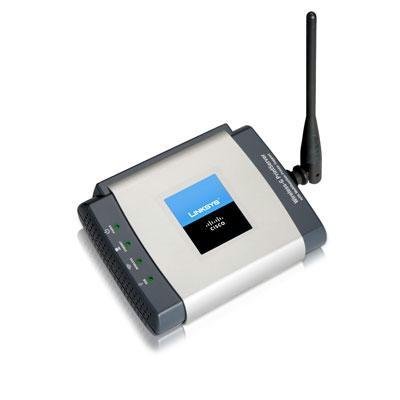
Buy Cisco-Linksys Wireless-G Print Server with Multifunction Printer Support

Posted by sale

Cisco-Linksys Wireless-G Print Server with Multifunction Printer Support for Sale - Review & Buy at Cheap Price


List Price : $104.99


Price : $104.99


Cisco-Linksys Wireless-G Print Server with Multifunction Printer Support Feature | Sale - Review & Buy at Cheap Price

  • Linksys Wireless-G Multifunction PrintServer - WPSM54G-RM
Brand:
List Price:
$104.99
Our Price:
$104.99
Total Price:
$104.99
Usually ships in 1-2 business days
Put It on Paper, Wirelessly
The multifunction printer is designed to provide constant wireless connectivity so everyone on your network can share it, any time they want, from anywhere in your home. The Wireless-G Multifunction PrintServer helps to break the bottleneck, free up your computer, and be more productive. Print, fax, scan, and copy, all without running wires.

Share Your Printer
Turn your multifunction printer into a wireless device. Connect your printer to your wireless network, or to your router with Ethernet cable. Now all the wired or wireless computers on your network can share a printer, any time. No need for a dedicated computer. And when it's connected wirelessly, you can place your printer anywhere you want.

Be More Efficient
Get more done, faster. No more swapping cables or waiting for access. No more turning on or leaving on the one computer that connects to the printer. Designed to allow multiple users to print anytime, or have exclusive use of fax, copy, or scan functions while completing their task. Large print buffer handles even very graphics-intensive jobs. Compatible with most multifunction printers.

Easy and More Secure
User-friendly Setup Wizard helps make installation a snap. Powerful encryption helps protect your wireless data. The compact case fits almost anywhere.

Cisco-Linksys Wireless-G Print Server with Multifunction Printer Support Overview | Sale - Review & Buy at Cheap Price

Put It on Paper, Wirelessly
The multifunction printer is designed to provide constant wireless connectivity so everyone on your network can share it, any time they want, from anywhere in your home. The Wireless-G Multifunction PrintServer helps to break the bottleneck, free up your computer, and be more productive. Print, fax, scan, and copy, all without running wires.

Share Your Printer
Turn your multifunction printer into a wireless device. Connect your printer to your wireless network, or to your router with Ethernet cable. Now all the wired or wireless computers on your network can share a printer, any time. No need for a dedicated computer. And when it's connected wirelessly, you can place your printer anywhere you want.

Be More Efficient
Get more done, faster. No more swapping cables or waiting for access. No more turning on or leaving on the one computer that connects to the printer. Designed to allow multiple users to print anytime, or have exclusive use of fax, copy, or scan functions while completing their task. Large print buffer handles even very graphics-intensive jobs. Compatible with most multifunction printers.

Easy and More Secure
User-friendly Setup Wizard helps make installation a snap. Powerful encryption helps protect your wireless data. The compact case fits almost anywhere.

Cisco-Linksys Wireless-G Print Server with Multifunction Printer Support Specifications | Sale - Review & Buy at Cheap Price

Cisco-Linksys Wireless-G Print Server with Multifunction Printer Support

Cisco-Linksys Wireless-G Print Server with Multifunction Printer Support Features

  • Linksys Wireless-G Multifunction PrintServer - WPSM54G-RM
Our Price : $104.99 Cisco-Linksys Wireless-G Print Server with Multifunction Printer Support Put It on Paper, Wirelessly
The multifunction printer is designed to provide constant wireless connectivity so everyone on your network can share it, any time they want, from anywhere in your home. The Wireless-G Multifunction PrintServer helps to break the bottleneck, free up your computer, and be more productive. Print, fax, scan, and copy, all without running wires.

Share Your Printer
Turn your multifunction printer into a wireless device. Connect your printer to your wireless network, or to your router with Ethernet cable. Now all the wired or wireless computers on your network can share a printer, any time. No need for a dedicated computer. And when it's connected wirelessly, you can place your printer anywhere you want.

Be More Efficient
Get more done, faster. No more swapping cables or waiting for access. No more turning on or leaving on the one computer that connects to the printer. Designed to allow multiple users to print anytime, or have exclusive use of fax, copy, or scan functions while completing their task. Large print buffer handles even very graphics-intensive jobs. Compatible with most multifunction printers.

Easy and More Secure
User-friendly Setup Wizard helps make installation a snap. Powerful encryption helps protect your wireless data. The compact case fits almost anywhere.

Reviews More...

Available at Amazon Check Price Now!


*** Product Information and Prices Stored: Oct 22, 2011 19:26:15
                                   

Visit : for Sale . panasonic viera connect